Resources
Source: https://amt.caltech.edu/resources Parent: https://amt.caltech.edu/services/av
Home / Resources
Resources
Related Pages
Resources
Room Reservations
*Please note, while AMT provides support in locations across campus, we do not manage the spaces listed below.*
List of facilities,including seating capacity, location, and campus extension to make a reservation.
Fill out this form to reserve Beckman Auditorium, Beckman Mall, and Ramo Auditorium. This website includes Information about these spaces, including pricing, capacity, and the reservation and facility use policies.
Contact Faculty Housing to reserve 383 Hill Annex and the Keck Center.
Check out the Library Space Reservation Request Form to request reserving spaces such as the Sherman Fairchild Amphitheater, 9th floor spaces in Caltech Hall, and the Dabney Library outdoor patio.
Read about the available spaces, including how to reserve, in the Resnick Sustainability Center.\
Contact the Registrar, 626-395-6354, [email protected], to reserve the following rooms:\ - East Bridge 201 (Feynman Lecture Hall), Downs B111, Downs 103, Downs 107, Keck 142, Kerckhoff 119, Lauritsen 269, Steele 102, and Watson 104.
Online reservation calendars for campus auditoria, classrooms, conference rooms, dining halls, presentation practice rooms, and group study spaces:
Biology & Biological Engineering
Chemistry & Chemical Engineering
Geological & Planetary Sciences\
Engineering & Applied Science\
- Mechanical and Civil Engineering rooms in Gates-Thomas\
\
Physics, Mathematics and Astronomy\
Avery, Bechtel Residence, and Hameetman Center\
- Catering event space request form\
- Online reservation system for Hameetman Center rooms and undergraduate house tents
Student Activities Center including the ASCIT Screening Room, Group Study Rooms, and Music Rooms\ requires an ASCIT web services system accountavailable to all undergraduate members of the Caltech community
Event Planning Resources
AMT works alongside other departments to support events on campus. Here are a few resources to assist with planning:
Marketing**Planning an event? Want marketing support? Fill out this form AFTER you have event details to request assistance from the Office of Strategic Communications.\
Caltech Logos and Templates**Looking for the Caltech logo, font guidelines, event poster templates, etc.? Caltech's strategic identity system is a guide to help individuals across campus correctly use Caltech symbols, fonts, colors, and photos in correspondence, websites, publications, and projects. \
Campus Programs & Community Relations, x4696\ Auditorium services can provide choral and platform risers, Beckman and Ramo Auditorium stage technicians, music stands, and ushers.
Campus Promotion\ Advertise your event to the Caltech community on the campus Calendar.\
Conference Websites & Online Registration, x8093\ Contact the EAS Communications Office for assistance with conference and seminar websites including online credit card registration systems, databases of participants, and online abstract submission and review.
Wireless Conference Access, x3500, [email protected]\ If you are sponsoring a conference or meeting with non-Caltech attendees, they can use Caltech's wireless network via eduroam if they have credentials from a participating institution. For others, learn how they can join the Caltech Visitor Network.\ \ Caltech Facilities, x4717\ A 24-hour service for various support activities including electrical assistance, air conditioning, and heating needs in all rooms. Custodial services can be reserved to set up chairs, tables, easels, and cleaning.\
Security, x4701\ Event notification, emergencies, access to buildings, escorts, parking information, and permits.
Recording Releases
Caltech's Office of General Counsel requests permission be obtained from any person being recorded on campus, including guest lecturers and speakers, using Caltech's standard Recording Release.
Choose from the following formats:
- PDF: version to print for speakers to sign in person
- Text-only: version that allows for granting permission via an emailed response. Instructions are provided. Please CC [email protected] so the release can be added to the centralized recording release archive.
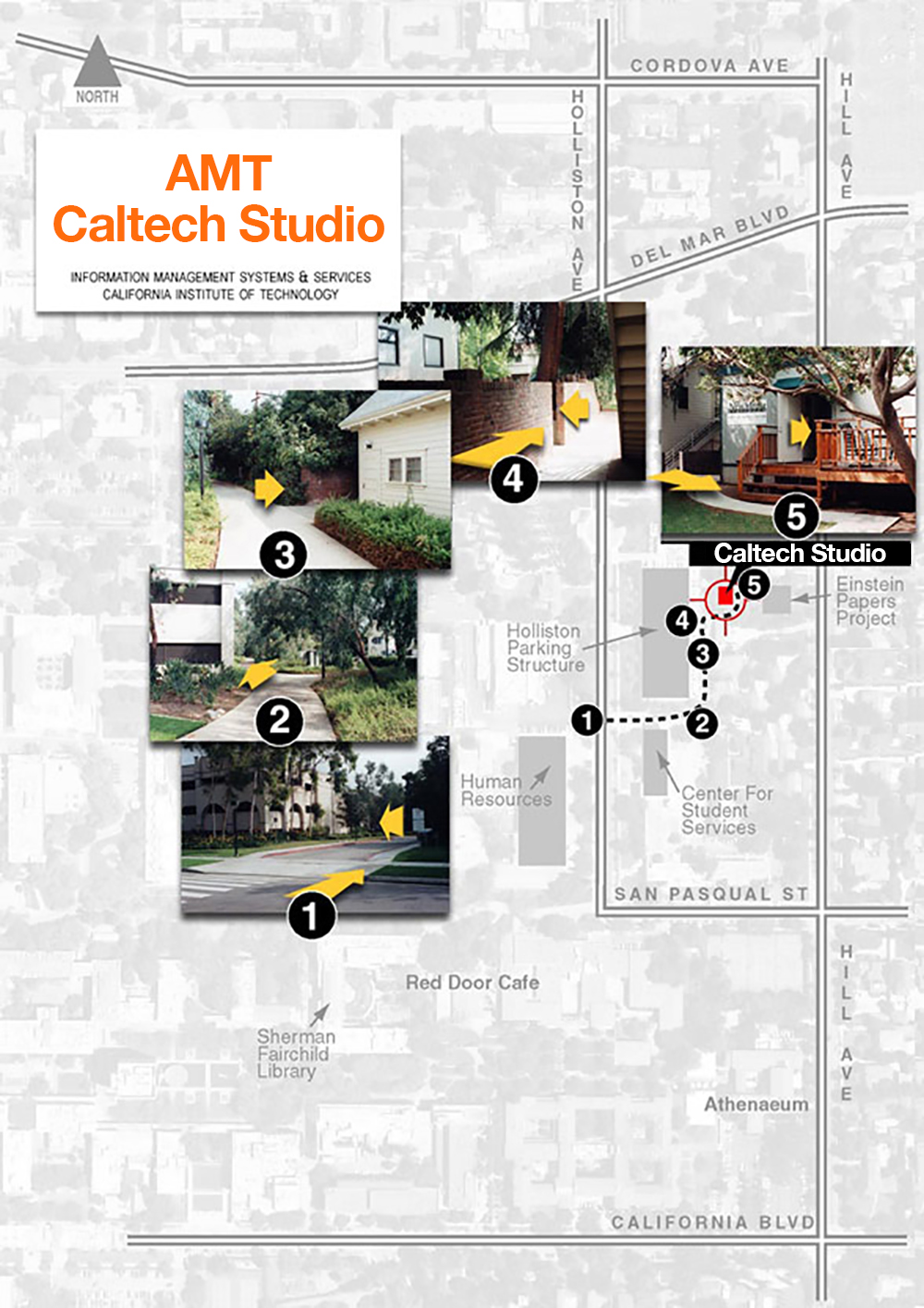
Walking Map to the Caltech Studio
AMT records live broadcast sessions, interviews, and lectures in the Caltech Studio located behind the Einstein Papers Project house at 363 S. Hill Ave. Here is a walking map to the studio.
Remote Interview Recording Guidelines
Framing and Lighting
- Place your laptop or webcam slightly above eye level, so you are not looking down or up
- Frame yourself so there is some space above the top of your head, but not too much
- If recording with your phone, position it slightly above your eye line in landscape/horizontal mode, rather than vertical.
- Make sure there is a light in front of you, and not behind you. If behind you, you will be dark and in silhouette. We recommend recording facing a window.
Audio
- If you have an external microphone, use it rather than the built-in computer microphone.
- We do not recommend using Bluetooth headphones with microphones, as the quality is not a good as wired headsets or external microphones
- Try to record in a quiet spot with a solid, broadband internet connection.
Wardrobe
- We recommend wearing what is most comfortable and appropriate for your working environment.
- We have come to find that shirts with collars provide nice structure and framing. In addition, freshly laundered, dry cleaned, and pressed items look best.
- Please avoid clothing with:
- stripes and plaids
- checks and herringbone patterns
- textured fabrics (basket weave, crushed velvet, seersucker)
- bright colors (saturated reds and yellows), but jewel tones (like dark blue, emerald green, deep red) are fine
- Most importantly, do not wear any clothing items with logos or images. The exception to this are Caltech or department logos.
If you are not sure what to wear, feel free to ask us or bring some options to the filming.
If you have any further questions, feel free to contact us.
FAQs
Where can I find audio visual equipment to pick up?
AMT has microphones, sound systems, projectors, and projection screens that can be picked up for a fee. GoPro recording kits are available at no cost. Please contact us to an arrange a pick-up time, [email protected].
The Caltech Library offers cameras, laptops, projectors, screens, etc. for check out at the TechHub and Sherman Fairchild Library circulation desk. Learn more on the Library's equipment loan website.
The Caltech Y offers audio visual equipment at a nominal fee to the Caltech community, including JPL. View their inventory and availability on the Caltech Y reservation website.\
What should I wear for my on-camera interview?
For your upcoming video interview and/or b-roll filming, we recommend the following wardrobe guidelines to ensure you look your best on camera:
- Comfort and Appropriateness: what is most comfortable and appropriate for your working environment.
- Shirts with Collars: These provide nice structure and framing. In addition, freshly laundered, dry cleaned, and pressed items look best.
- Avoid the following:
- stripes and plaids
- checks and herringbone patterns
- textured fabrics (basket weave, crushed velvet, seersucker)
- bright colors (saturated reds and yellows), but jewel tones (like dark blue, emerald green, deep red) are fine
- Logos and Images: Please avoid clothing with logos or images, except for Caltech or department logos.
If you're unsure about what to wear, feel free to reach out to us for advice or bring a few options on the day of filming.
Our Services | Resources | Portfolio | About Us | Contact AMT
phone 626.395.4657 | email [email protected]